Canonical References in Radicle: A Hands-On Guide
How branch and tag authority works in a peer-to-peer world: agreeing whose develop branch or releases/v1.0.0 tag is the "up-to-date" one, and setting up branch/tag protection rules.
On GitHub or GitLab, there is exactly one main branch.
It lives on the server.
By convention, the GitHub server is the single source of truth, and nobody ever asks "whose main is the real one?".
In Radicle, on the other hand, there is no single server to act as the authoritative source of truth.
Every collaborator runs a node that stores its own complete copy of the repository.
There is nothing stopping two collaborators each having their own develop branch
(via git namespaces) and each pointing to a different commit.
So how do collaborators agree on what develop points to, what commit the releases/v1.0.0 tag is on, and so on?
The way Radicle solves this is with Canonical References. Instead of authority coming from location ("it’s on the server"), authority comes from agreement ("enough trusted people point at the same commit"), and is cryptographically verifiable.
What a Canonical Reference is
A Canonical Reference is a top-level Git reference, say, refs/heads/develop, that represents the authoritative
version of a branch or tag.
Radicle computes Canonical References dynamically based on two factors:
-
The rules defined in the repository’s identity document.
-
The state of each delegate’s namespaced copy of the repository and their references.
If enough people agree on the same commit for a ref (a quorum), the node updates the canonical ref and emits a
CanonicalRefUpdated event. If they do not agree, the canonical ref stays where it was.
In the following example, the canonical main branch is established when two delegates agree (threshold=2):
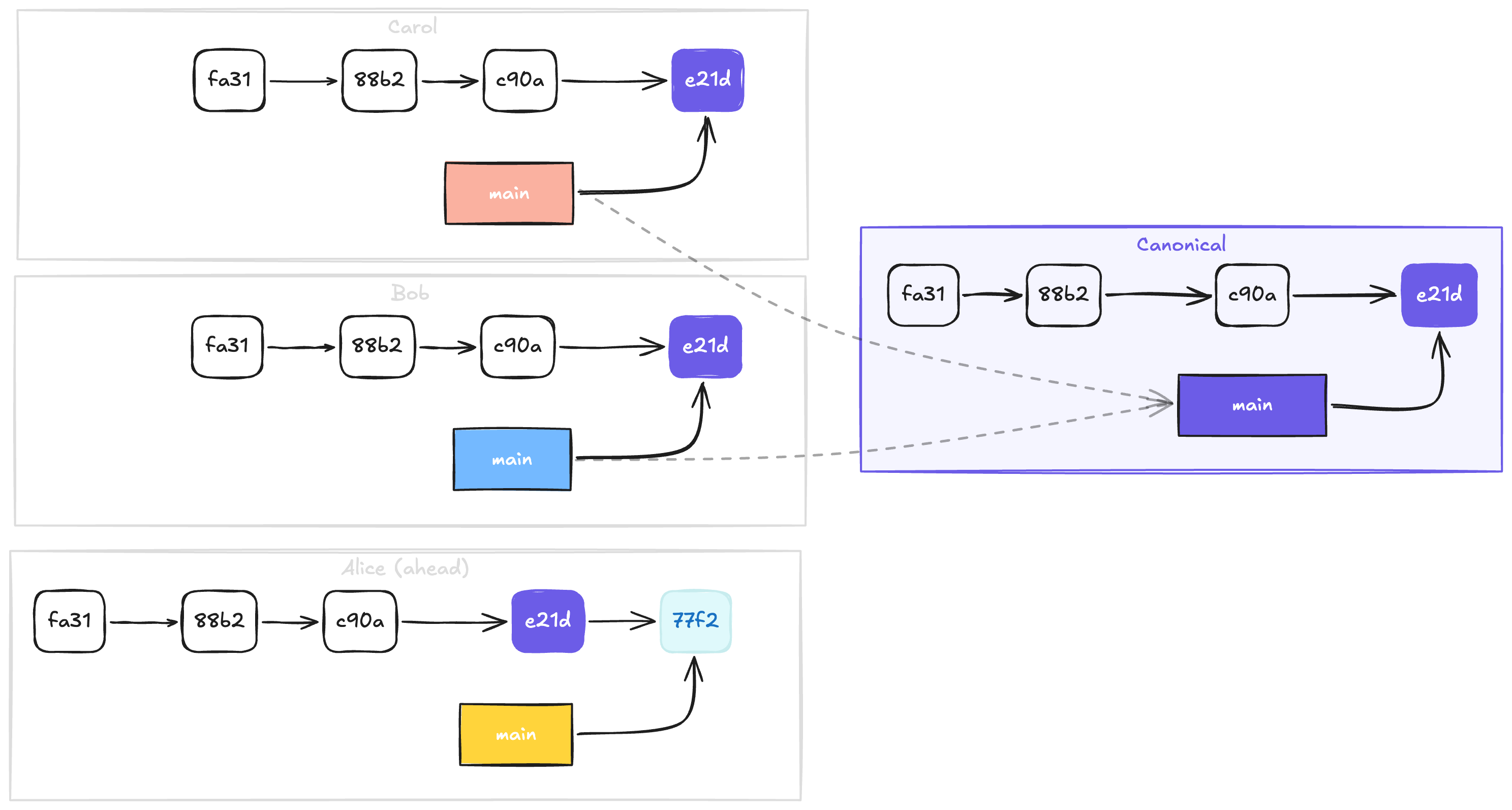
If you have used branch protection rules on GitHub, GitLab, etc., you already have the right mental model:
| Centralised forge | Radicle |
|---|---|
Server holds one true copy |
Every peer holds their own copy |
Authoritative because of location |
Authoritative because trusted peers agree |
Branch protection rules |
Canonical Reference rules |
"Restrict who can push" |
|
"Require N approving reviews" |
|
Canonical Reference rules are branch protection for a world without centralised servers.
The rest of this guide walks you through setting them up, from solo project to multi-maintainer tag signing.
Step 1 - See what you already have
The identity document
Every Radicle repository has an identity document: versioned, signed metadata recording the repo’s name, description, default branch, and delegates (the maintainers). Think of it as the repo’s settings page, except it is not stored on a server; it is itself a signed, replicated object.
View it any time:
rad inspect --identityYou will see something like:
{
  "payload": {
    "xyz.radicle.project": {
      "defaultBranch": "main",
      "description": "My project",
      "name": "my-project"
    }
  },
  "delegates": [
    "did:key:z6MknSLrJoTcukLrE435hVNQT4JUhbvWLX4kUzqkEStBU8Vi"
  ],
  "threshold": 1
}
The Canonical References section (which would appear under a xyz.radicle.crefs key) is not there yet.
But Radicle already uses the delegates and threshold from the identity document, to compute your default
branch (main in the above example).
As the sole delegate with a threshold of 1, your main is already canonical the moment you push.
You are the single source of truth — just like being the only person with push access on a forge.
Step 2 - Add some canonical tags
So, the default branch is covered automatically, but tags are not.
If you want rad clone to deliver authoritative tags, for example, so that your users can check out specific releases,
you need a rule.
rad id update \
    --title "Add canonical reference rule for tags" \
    --payload xyz.radicle.crefs rules \
    '{ "refs/tags/*": { "allow": "delegates", "threshold": 1 } }'
Run rad inspect --identity again.
A new xyz.radicle.crefs section appears:
"xyz.radicle.crefs": {
    "rules": {
        "refs/tags/*": {"allow": "delegates", "threshold": 1}
    }
}
This is the Radicle equivalent of a branch protection rule on a forge:
| Forge concept | Radicle equivalent |
|---|---|
"Restrict who can push" |
|
"Require N approving reviews" |
|
With "allow": "delegates" and "threshold": 1, any single delegate’s tag becomes canonical.
Since you are the only delegate, that means your tags are authoritative immediately.
|
Note
|
The * wildcard matches across path levels. refs/tags/* matches both refs/tags/v1.0 and refs/tags/qa/v1.0.
|
Step 3 - Add rules for another branch
Long-lived branches beyond the default (e.g. develop) need their own rules.
You can configure several patterns at once. Some can use the delegates shorthand, while some can just use an
explicit list of DIDs, and those DIDs do not have to be delegates, allowing for more fine-grained permissions.
Below, tags under qa/ are handled by a Quality Assurance (QA) lead, who is not a delegate:
rad id update \
    --title "Configure canonical references" \
    --payload xyz.radicle.crefs rules '{
        "refs/heads/develop":  { "allow": "delegates", "threshold": 1 },
        "refs/tags/*":         { "allow": "delegates", "threshold": 1 },
        "refs/tags/qa/*":      { "allow": ["did:key:z6Mkt67GdsW7715MEfRuP4pSZxJRJh6kj6Y48WRqVv4N1tRk"], "threshold": 1 }
    }'
This replaces the entire rules object, so include every rule you want - not just the new ones.
|
Note
|
The threshold of a "delegates" rule cannot exceed the number of delegates - so as a solo maintainer,
1 is the highest it goes. For an explicit list, the ceiling is the size of the list instead, whether or not
anyone on it is a delegate.
|
How pattern matching works
When more than one pattern matches a reference, the most specific one wins:
-
refs/tags/qa/v1.0matches bothrefs/tags/*andrefs/tags/qa/*. The second has more path components, so it wins - only the QA lead’s tag counts. Even your ownqa/tags are ignored, delegate or not. -
refs/tags/v1.0matches onlyrefs/tags/*- any delegate’s tag (that is: yours) becomes canonical.
Other pattern rules:
-
Patterns must be fully qualified (
refs/heads/…orrefs/tags/…). -
refs/rad/…is reserved for Radicle internals and will be rejected.
|
Important
|
Don’t write a rule for your default branch. Radicle already derives one automatically from the
top-level incompatible payloads: The rule(s) xyz.radicle.crefs.rules.["refs/heads/main"]
matches the value of xyz.radicle.project.defaultBranch ('refs/heads/main').
The fix is simply to remove the default-branch rule and keep your others. |
Step 4 - Require multiple people to agree
So far, every threshold has been 1. The real power of Canonical References is requiring several people to
agree - the Radicle equivalent of turning on branch protection with required reviews. And because explicit
allow lists have their own threshold, you can do this without touching the delegate set at all.
In the example below, two release managers - neither of them a delegate - both have to create the release tag before it can be considered canonical:
rad id update \
    --title "Restrict release tags to release managers" \
    --payload xyz.radicle.crefs rules '{
        "refs/tags/release/*": {
            "allow": [
                "did:key:z6MkpQTLwr8QyADGmBGAMsGttvWzP4PojUMs4hREZW5T5E3K",
                "did:key:z6MknG1nYDftMYUQ7eTBSGgqB2PL1xK5Pif33J3sRym3e8ye"
            ],
            "threshold": 2
        }
    }'
Remember from Step 3 that this replaces the whole rules object - in a real repository you would keep the
develop and qa/ rules in the same JSON. We trimmed them here for readability.
|
Note
|
For your local identity document changes to sync to others, you need to invoke rad sync.
|
|
Note
|
If inline JSON and shell quoting become tedious, open the whole identity document in your editor: |
rad id update --editStep 5 - Collaboratively Publish a Release Tag
Time to see the Step 4 rule in action: Carol and Dave, our two release managers, are going to publish
release/v1.0.0 together. One thing has to happen first, though.
Follow the release managers
When your node computes a Canonical Reference, it counts votes by reading each allowed voter’s copy of the reference from your own local storage. By default, a node only replicates the repository copies of the delegates and of peers you explicitly follow.
Carol and Dave are not delegates, so their tags never even reach your node on their own - and a vote that never arrives can never be counted. Everyone who wants to observe the canonical release tag must follow them. That includes Carol and Dave themselves: each needs the other’s vote to see the quorum.
rad follow z6MkpQTLwr8QyADGmBGAMsGttvWzP4PojUMs4hREZW5T5E3K --alias carol
rad follow z6MknG1nYDftMYUQ7eTBSGgqB2PL1xK5Pif33J3sRym3e8ye --alias dave|
Note
|
rad follow takes a Node ID (NID): the DID from the allow list without its did:key: prefix.
If you would rather replicate every peer’s copy of this repository, rad seed <rid> --scope all achieves
the same without naming anyone.
|
Publish the tag
Each release manager, from their own checkout of the repository:
rad clone <rid>
cd my-project
git tag release/v1.0.0
git push rad refs/tags/release/v1.0.0
After the first push, nothing visible happens - with threshold: 2, one vote is not a quorum, so the
canonical reference simply does not exist yet. The moment the second release manager pushes the same tag
on the same commit, the nodes that follow both of them fetch it, quorum is reached, and each node updates
its top-level refs/tags/release/v1.0.0.
|
Warning
|
Quorum for tags requires the voters to point at the exact same Git object. The lightweight tags
above point directly at the commit, so two managers tagging the same commit always agree. Annotated or
signed tags (git tag -a, git tag -s) are distinct objects even when they name the same commit, so two
independently created ones (i.e. if each manager tries to create a new annotated/signed tag, pointing to
the same commit) will never converge. To use annotated/signed tags, have one manager create the tag
(e.g. git tag -a v1.0.0 -m "Release 1.0.0: finally!" -s) and
the others fetch and endorse that exact object as their vote: rad remote add <their-nid> --name carol,
then git fetch carol refs/tags/release/v1.0.0:refs/tags/release/v1.0.0 and push the tag as above.
|
Verify on each end
Every participant can ask their own node for the canonical tag - the rad remote in a working copy serves
the canonical (top-level) references:
$ git ls-remote rad refs/tags/release/*
64d15b2c18b0aa896f2c7d43407f728b02a0d0cf	refs/tags/release/v1.0.0
Run this as Carol, as Dave, or as any delegate who follows them both: the same commit hash comes back
everywhere. No server told anyone what release/v1.0.0 is - their nodes each computed it from the same
votes. To bring the tag into your working copy, run git fetch rad; a fresh rad clone delivers it
automatically.
Step 6 - Verify everything works
1. Check your rules:
rad inspect --identityConfirm the xyz.radicle.crefs block contains the patterns, allow values, and thresholds you expect.
2. Check the identity history (the audit trail a forge would show under "Settings > History"):
rad id
rad id show <revision-id>
3. Confirm a reference became canonical: after the required voters have pushed and your node has fetched, the node
computes whether quorum was reached and updates the top-level reference. The simplest check is a git ls-remote rad
that shows all the canonical references:
radicle-desktop » git ls-remote rad
f922e9415ce41f452e84df2fb95c9dab507db64b    HEAD
f922e9415ce41f452e84df2fb95c9dab507db64b    refs/heads/main
733dd1a5b34020a39f4367b968dcb387ac683dc1    refs/tags/releases/0.10.0
44b9b6e66362005331a3e0bb2490ad51dce999e9    refs/tags/releases/0.11.0
02f16b026e7773d9b2963a522202652da9716da4    refs/tags/releases/0.12.0
17e8ca058e44b1a8989de749338a6fa7a6e49697 refs/tags/releases/0.9.0|
Note
|
Quorum mechanics. For commits, Radicle respects Git ancestry. If voters are on one line of history, the most advanced commit with enough support wins (like a fast-forward). Genuine divergence means no quorum. |
Troubleshooting
incompatible payloads error
incompatible payloads ... matches the value of xyz.radicle.project.defaultBranch ...
Possible resolutions: Change the name of the default branch or remove the rule(s).
You probably tried to add a rule matching your default branch. That rule is synthesized automatically and reserved, so the CLI helpfully prevents you from confusing your future self.
"reference-like string '…' is protected because it starts with 'refs/rad/'"
You tried to use a pattern under refs/rad, which is reserved for Radicle internals.
Use refs/heads/… or refs/tags/….
The Canonical Reference does not update after a push
No quorum was reached. Common reasons:
-
Diverged histories. The allowed voters pushed genuinely different lines of history. Reconcile (merge or rebase) and push again. On a forge, the server would have rejected the non-fast-forward push; here, it simply stays non-canonical.
-
Diverging tags. A tag rule needs voters to point at the exact same tag object. Delete and re-create the tag identically.
-
Not enough voters yet. With
threshold: 2, the reference holds its previous value until a second allowed voter pushes. -
Wrong voters. The people who pushed are not in the rule’s
allowset (or are not delegates, ifallowis"delegates").
A threshold change was rejected
The threshold must be at least 1, at most 255, and never larger than the number of allowed voters:
the number of delegates for a "delegates" rule, or the size of the list for an explicit allow list.
If a change to the repository (say, removing a delegate) would leave a rule’s threshold above its ceiling,
adjust the rule in the same rad id update call.
My identity change is "active" but not applied
With multiple delegates, identity changes are proposals.
They take effect only once enough delegates run rad id accept <revision-id>.
Quick Reference
To summarize, here’s a quick table with some commands you’ll need when working with canonical references:
| Task | Command |
|---|---|
View current rules and identity |
|
View current canonical references |
|
Make tags canonical |
|
Make a branch canonical |
|
Restrict voting to specific people |
|
Follow a voter so their refs (votes) reach your node |
|
Edit the whole identity document |
|
List identity revisions |
|
Inspect a specific revision |
|
Accept a proposed change (repositories with multiple delegates) |
|
And remember, some rules of thumb:
-
Authority comes from agreement, not from a server.
-
The default branch is the canonical automatically — never write a rule for it.
-
A rule answers two questions: who votes (
allow) and how many must agree (threshold). The most specific matching pattern wins. -
Updates to the identity document itself always require a majority of delegates to accept them, regardless of any
thresholdvalues set in any rules. Expect a follow-up blog post that explores this topic further.